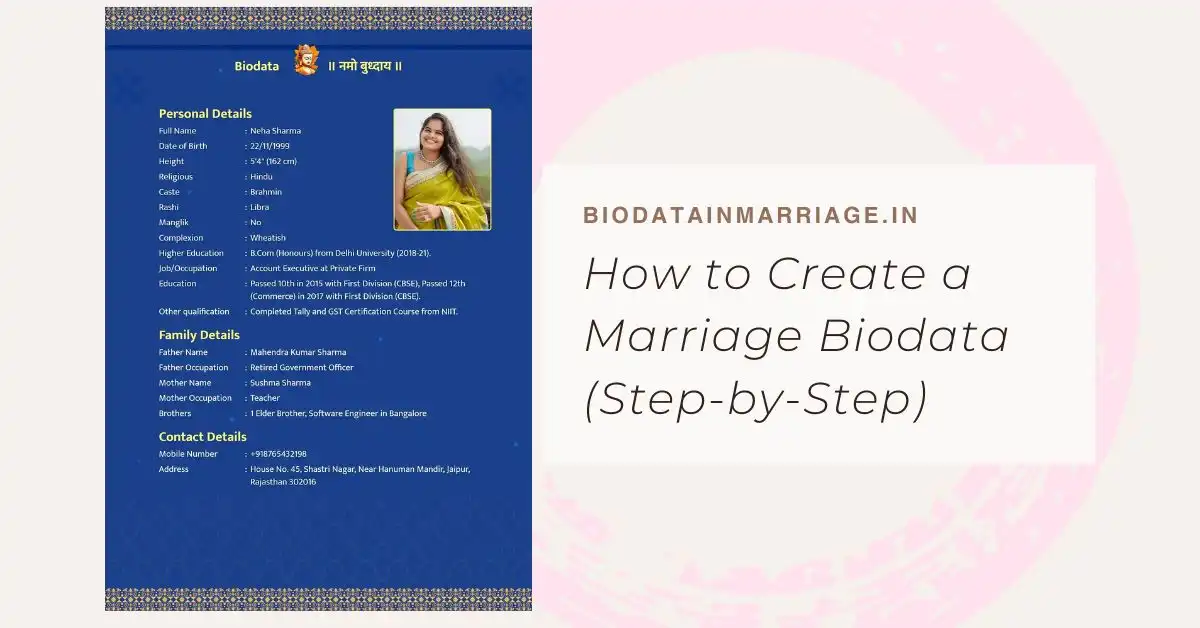
In this guide: A practical, step-by-step walkthrough on how to create a marriage biodata from scratch. You'll learn what to write, how to organize your thoughts, and how to avoid common formatting mistakes.
How to Create a Marriage Biodata (Step-by-Step)
Staring at a blank document and trying to summarize your entire life for a prospective partner can feel overwhelming. Creating a marriage biodata doesn't have to be a stressful chore. If you follow a clear, step-by-step process, you can easily craft a profile that feels authentic, looks professional, and effectively highlights your best traits.
Whether you are relying on family networks or uploading your profile to matchmaking portals, knowing how to structure your information is critical. Let's break down exactly how to create a marriage biodata that gets noticed.
Step 1: Choose the Right Format
Before writing a single word, you need to decide how your profile will look. A text-heavy, poorly aligned Word document is no longer the standard. Families expect a clean, readable layout.
You can explore various marriage biodata formats and templates to find a style that matches your aesthetic-whether that’s a traditional floral border or a modern, minimalist layout. We highly recommend using an automated builder because it mathematically spaces your text and aligns your photo perfectly.
Step 2: Gather Your Basic Information
Start by compiling your factual details. At this stage, you just need raw data. Group this information into three core sections:
- Personal: Full name, date of birth, time of birth, height, weight (optional, but requested by some communities), and current city.
- Professional: Highest educational degree, college name, current job title, company name, and annual income.
- Family: Father's name and occupation, mother's name and occupation, details of siblings, and your ancestral town (Native Place).
Step 3: Select a High-Quality Photograph
Never underestimate the power of a good photograph. Your picture is the hook that prompts someone to read the rest of your biodata.
Skip the blurry selfies, group photos with cropped-out friends, or heavily filtered images. Choose a clear, recent portrait where you are smiling naturally. Good lighting naturally enhances the photo, so try to take your picture outdoors or near a large window.
Step 4: Write the "About Me" Section
This is where you inject personality into your biodata. The basic facts tell someone *what* you are, but the "About Me" section tells them *who* you are.
Write 3 to 4 short sentences about your lifestyle. Mention your hobbies, what you enjoy doing on the weekends, and a brief note about your value system. If you need inspiration, check out our guide on tips to make your marriage biodata stand out.
Step 5: Define Your Partner Expectations
Be clear but realistic. Instead of creating an impossible checklist of physical and financial demands, focus on compatibility traits.
Phrasing matters here. Rather than writing, "Must be earning 6 figures and highly educated," try something like, "Seeking a professionally driven partner who values family and shares my passion for travel." It sounds infinitely warmer while conveying the same core desire.
Step 6: Review, Edit, and Generate
Grammar and spelling mistakes are instant red flags. Read through your details twice. Ensure dates, phone numbers, and names are correct. Once you're confident, you can use a free marriage biodata generator to assemble the final PDF file instantly.
Make It Easy With Our Creator Tool
Why start from a blank sheet? Build your optimized marriage biodata right here, right now.
Start Your Biodata NowFrequently Asked Questions
Can I create a marriage biodata on my phone?
Yes. Modern biodata making platforms like ours are fully mobile-responsive. You can seamlessly type in your details, upload a photo from your gallery, and download the PDF directly onto your smartphone.
Should I mention my past relationships?
No, a marriage biodata is an introductory document. Discussions regarding dating history or past relationships should be handled personally during private conversations, not broadcasted on a profile.
How do I send my completed biodata to others?
Once you generate and download the PDF file, you can easily attach it to emails, send it via WhatsApp to matchmakers and family members, or upload it to matrimonial websites.